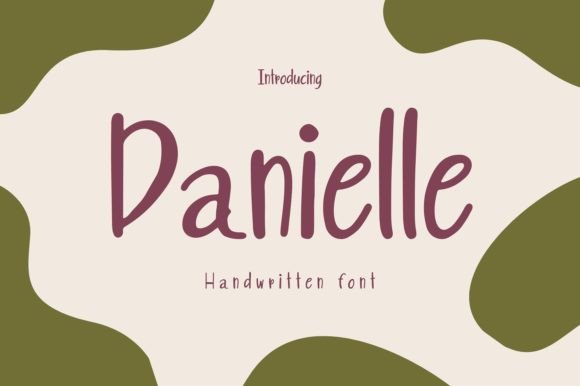
Danielle: A Playful Handwritten Font for Modern Web Design
Danielle is a charming handwritten font that brings a sense of lightness and authenticity to digital design. As a web designer, I often look for typefaces that balance personality with usability, and Danielle delivers both. Its soft, flowing characters are ideal for adding a human touch to websites, landing pages, and digital products without compromising readability or brand clarity.
Why Danielle Works for Web Design
When designing for the web, every font choice affects how users interact with the content. Danielle’s delicate strokes and open spacing make it highly readable at larger sizes, especially in headers and hero sections. It shines in digital spaces where a warm, approachable tone is needed—think boutique stores, personal blogs, or coaching websites. The font’s lightness ensures it doesn’t overwhelm the layout, allowing other design elements to breathe around it.
As a script font, Danielle is best used for short bursts of text. It’s not ideal for long paragraphs, but that’s where its strength lies: drawing attention to headlines, call-to-action buttons, and branding elements. Whether you're designing a product landing page or a portfolio site, Danielle adds a distinctive voice to your typography without sacrificing usability.
Enhancing Brand Identity with Danielle
Brand tone is often shaped by visual language, and typography plays a central role. Danielle’s playful and authentic character makes it a strong fit for brands that want to feel personable and creative. It’s especially effective for female-led businesses, lifestyle brands, and digital creators who want to stand out with a unique typeface.
When used consistently across web assets—from logo text to social media graphics—Danielle helps reinforce a cohesive brand identity. Pair it with a clean sans serif like Helvetica or Open Sans for body text, and you’ll create a visual rhythm that guides users naturally through the page.
Using Danielle in Key Web Sections
- Hero Headers: Danielle’s flowing style works beautifully in large hero titles, especially when paired with a minimal background.
- Call-to-Action Buttons: Use it in short phrases like “Get Started” or “Learn More” to add personality without distracting from the action.
- Blog Headers: Ideal for blog post titles or featured image overlays where a handwritten touch adds warmth.
- Portfolio Sites: Perfect for creative professionals like illustrators, designers, and writers who want to highlight their unique voice.
- Online Store Banners: Use Danielle in promotional banners or featured product titles for a boutique feel.
Readability Considerations for Digital Layouts
Danielle performs best when used thoughtfully in digital layouts. On mobile screens, ensure it’s scaled appropriately—avoid using it too small, especially on buttons or image overlays. When placing Danielle over images or dark backgrounds, consider adding a subtle text shadow or background overlay to maintain legibility.
For responsive design, test how Danielle renders across devices. Some handwritten fonts can appear inconsistent on lower-resolution screens, so always preview in real-world conditions before final deployment.
Font Pairing Tips for Web Designers
One of the most effective ways to use Danielle is in combination with more structured typefaces. For example, pairing it with a minimalist sans serif like Lato or Montserrat creates a strong visual contrast that enhances hierarchy and user focus. If you’re designing a more editorial-style website, consider pairing Danielle with a serif font like Merriweather or Playfair Display for a refined yet expressive look.
When building a brand kit or digital style guide, use Danielle as your primary display font and pair it with a more neutral secondary font for navigation, body text, and form labels. This ensures your typography feels intentional and supports both aesthetics and usability.
Technical and Licensing Notes
Before using Danielle in a live project, check the font’s webfont availability and file formats. Most premium script fonts like Danielle come with multiple weights, alternates, and multilingual support, which is essential for international brands or content creators with diverse audiences.
Always verify the licensing terms, especially for commercial use. Many script fonts are sold with specific permissions for personal or commercial projects, and some require separate licenses for client work or template sales. For web use, ensure the font is optimized for performance and includes WOFF2 support to reduce load times.
Final Thoughts on Choosing Danielle
Danielle is more than just a decorative font—it’s a versatile tool for crafting memorable digital experiences. Whether you’re designing a landing page, rebranding a blog, or launching an online store, Danielle brings a sense of warmth and creativity that resonates with users. By understanding how to use it effectively within your layout, you can elevate both the visual appeal and functional clarity of your designs.