Celestyal: A Dainty Handwritten Font for Makers and Creative Sellers
As I sat down to design a set of candle labels for my latest lavender soy candle line, I knew the font needed to reflect the soft, natural vibe of the product. I had downloaded Celestyal a few weeks prior, curious about its dainty, handwritten charm. As I typed out “Lavender Fields” in Celestyal, the letters flowed together like real handwriting—organic, personal, and just a little whimsical. It was exactly the look I wanted for my brand.
What Makes Celestyal Stand Out?
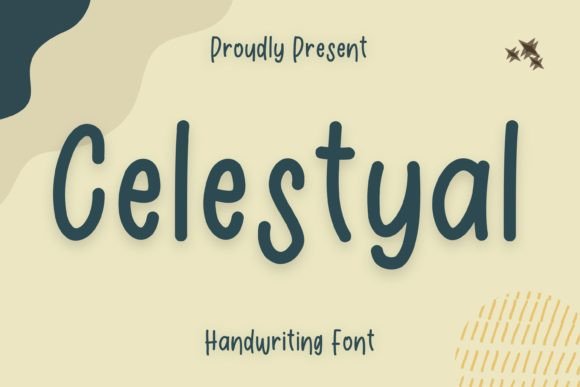
Celestyal is a script font that feels both modern and timeless. Its thin strokes and subtle texture give it a delicate appearance, while the natural variation in letterforms adds character and warmth. It’s the kind of font that feels like it was written by hand, not designed on a computer. This makes it especially appealing for crafters, Etsy sellers, and printable creators who want to infuse personality into their products without overwhelming the design.
Perfect for Handmade Product Labels and Tags
One of the first places I used Celestyal was on product tags for my handmade soap line. I wanted something clean but not too formal—something that felt handmade but still professional. I paired it with a simple sans serif font for the ingredient list and found the contrast between the two was subtle but effective. The tags printed beautifully on kraft paper, and the font scaled well even at small sizes. Whether it’s for candles, soaps, or boutique gift tags, Celestyal holds up well in both digital mockups and physical prints.
Bringing Invitations and Greeting Cards to Life
I recently tested Celestyal for a set of birthday invitations and was impressed with how elegant it looked on printed cardstock. I used it for the name and event title, then paired it with a clean serif font for the body text. The result was a balanced, visually pleasing design that felt personal and celebratory. It’s especially effective for wedding invitations, baby showers, and thank-you cards—anything that benefits from a warm, handwritten touch.
Designing Seasonal and Holiday Printables
When I started working on my autumn printable collection, I wasn’t sure if a dainty font like Celestyal would work for a more rustic theme. But when I paired it with earthy tones and wood textures, it actually enhanced the cozy, handmade feel. I used it for phrases like “Welcome Home” on a farmhouse-style sign and “Happy Fall” on a sticker sheet. It also worked well for holiday tags and gift tags, especially when I added a little swash or alternate character to make the text feel more decorative.
Creating Digital Downloads and Planner Pages
For digital product creators, readability and style are equally important. I added Celestyal to a set of minimalist planner stickers and found that its soft curves and light weight gave the pages a gentle, approachable look. It’s not too bold, so it works well as decorative text rather than body copy. Whether you’re designing digital stickers, journal inserts, or quote cards, Celestyal adds a personal flair without distracting from the overall layout.
Using Celestyal on Merchandise: Mugs, Shirts, and Tote Bags
I tested Celestyal on a few SVG designs for Cricut and Silhouette machines, including a “Hello Sunshine” tote bag and a custom name mug. The font scaled beautifully and cut cleanly, even at smaller sizes. For names or short phrases, it’s ideal. I made sure to check the spacing between letters when cutting vinyl, as some script fonts can lose clarity if the letters are too close. But with Celestyal, the natural spacing felt intuitive and required minimal adjustments.
Font Pairing Tips for Makers
One of the best things about Celestyal is how well it pairs with other fonts. When designing a product label, I often use it with a clean sans serif like Montserrat or Lato for the supporting text. This creates a nice visual hierarchy without feeling cluttered. For wedding invitations, I’ve paired it with a classic serif font for a timeless, elegant look. And for digital templates or social media graphics, I’ll sometimes use it alongside a bold display font to create contrast and visual interest.
Readability and Design Practicality
While Celestyal is incredibly versatile, it’s best used for short text—think titles, names, quotes, and decorative phrases. It’s not ideal for long paragraphs or body text due to its thin weight and script style. When printing small stickers or product tags, I recommend testing the font at the intended size first to ensure legibility. It also works best on light backgrounds, though I’ve had success using it on soft pastel or textured paper as well.
Checking Licensing and Font Features
Before using Celestyal in your shop, it’s important to verify the font’s licensing. Most premium fonts like Celestyal include commercial use rights, but it’s always good to double-check, especially if you’re selling physical products, printables, or digital templates. I also recommend exploring the font files to see if they include alternates, ligatures, swashes, and multiple weights. These features can help customize your designs and make your products feel more unique.
Final Touches: Branding and Shop Consistency
Since incorporating Celestyal into my product line, I’ve noticed a more cohesive brand identity across my shop. From packaging to social media graphics, the font has become part of my visual language. It’s subtle, but customers have commented on how “soft” and “inviting” my designs feel. If you’re looking to elevate your handmade products with a font that’s both elegant and easy to use, Celestyal might just be the perfect match for your creative shop.